macroping
Date: 2026 04-April 14
I have an ovation DCS system

There are PLC's, network switches, Ovation Drops, routers, zumlink radios, and more

I want to understand and document the system better.

I am thinking of leveraging the storage and response and connectivity capacities of every piece of hardware that I can, in order to orchestrate complex responses beyond simple pings, so that I can better experiment with and understand the system.

Triggers from an Ovation Graphic would be interesting. Also proof of work program tasks. Distributed documentation and connectivity checks are the most pragmatic use cases, but really i am trying to demonstrate connectivity. Like a dog during an obstacle course. Make sense?
It makes perfect sense. You're looking to move past "Is the light green?" and toward "Does the data flow correctly across different protocols and logic layers?" By treating your hardware like a series of checkpoints in an obstacle course, you turn a static architecture into a dynamic, observable environment.
To document and experiment with an Ovation DCS effectively, you can leverage the native capabilities of each component to act as a "smart hop."
1. Orchestrating the "Obstacle Course"
Instead of a simple ping, you can create a Deterministic Verification Loop. Each "jump" in your course should validate a specific layer of the stack.
-
The Ovation Drop: Use the Control Builder to create a dedicated "Diagnostic Drop." This drop can host an algorithm that tracks the health of remote PLC connections.
-
The PLC (The Edge): Configure a heartbeat logic. Instead of just being "on," have the PLC increment a register. If the Ovation Drop sees the register changing, you have proven bidirectional data integrity, not just a physical link.
-
The ZumLink Radios: These are often the "bottleneck" in a course. Leverage their internal signal-to-noise ratio (SNR) and throughput stats. You can pull these via SNMP or Modbus registers and map them directly into Ovation points to see real-time "friction" in your network.
2. Triggers from Ovation Graphics
The Graphics Builder is your "Command Center." You can create interactive triggers that act as the "Go" signal for your experiments.
-
Logic-Driven Buttons: Map a soft button on a graphic to a discrete point in an algorithm. When toggled, it can initiate a sequence that polls every PLC and returns a "Course Completion" time.
-
Dynamic Visual Feedback: Use conditional formatting (color changes, animations) to show the path of a packet. If a ZumLink radio latency exceeds a threshold, the "obstacle" on the screen turns yellow, providing an immediate visual map of system performance.
3. Distributed Documentation & Proof of Work
To make documentation "living," you can store configuration metadata across the devices themselves.
-
Proof of Work Program Tasks: Assign specific logic tasks to different Drops. For example, Drop A performs a calculation, passes the result to Drop B, which verifies it against a lookup table and writes the "Success" flag to a historian. This proves that the distributed database is synchronized.
-
Version Tracking: Use the "headquarters" ancillary field (or similar metadata fields) within your Ovation database to store the last-verified date of a specific link.
-
Self-Documenting Nodes: Use the description fields in your network switches or the internal "Banner" of your routers to store the specific purpose of that node in your "course."
4. Connectivity Beyond the Ping
To truly demonstrate connectivity, you need to test the Application Layer:
| Device | Experiment | Proof of Work |
|---|---|---|
| Switch | Port Mirroring | Capturing a specific Ovation packet to prove VLAN integrity. |
| Router | ACL Validation | Attempting a forbidden connection to prove the "walls" of the course work. |
| PLC | Register Shifting | Moving a value through a series of registers to test memory health. |
| ZumLink | Packet Retransmission | Monitoring the "Retry" count during a high-load graphic update. |
Implementation Tip: The "Audit" Point
Create a specific Point Group in Ovation labeled SYS_EXP. Every piece of the obstacle course should report to a point in this group. This allows you to export a single report that serves as both a connectivity map and a performance benchmark.
Does this "obstacle course" framework align with the specific hardware layout you have in mind, or should we dive deeper into the specific Modbus/SNMP configurations for the ZumLink radios?
What is a point group? that sounds more leveragable than simply adding metadata / ancillary fields to each point that identify the system name.


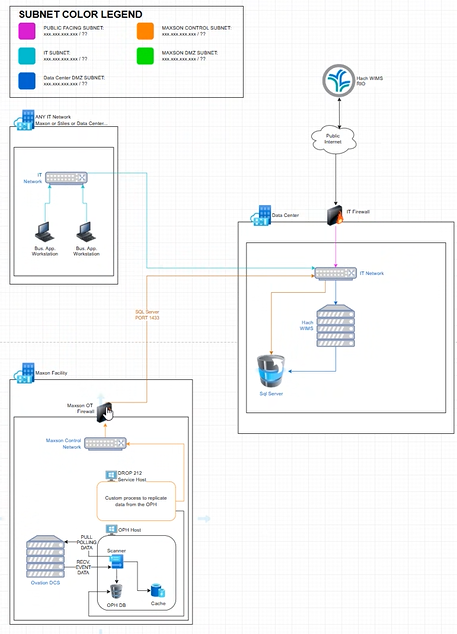
also, I want to characterize each piece of hardware by what other pieces of hardware it can talk to. For example, my personal laptop cannot ping a zumlink radio or a plc, because it is not on the secure DCS network, but i can make those pings from...where
In the Ovation ecosystem, a Point Group is a far more powerful logical container than a simple metadata tag. While an ancillary field like "headquarters" tells you what a point is, a Point Group defines how it behaves and where it appears collectively.
1. Why Point Groups are "Leveragable"
Think of a Point Group as a functional filter. Instead of hunting through 10,000 points, you can group them by the "obstacle" they represent in your system.
-
Global Actions: You can assign specific scan rates, alarm priority levels, or security permissions to an entire group at once.
-
Dynamic Displays: In the Ovation Operator Station, you can call up a "Group Display." If you create a group called
COURSE_CHECKPOINT_1, you can instantly see the health of the PLC, the Radio, and the Switch associated with that specific leg of your network on one screen. -
Historian Integration: You can easily tell the Ovation Historian to collect data for a specific Point Group. This allows you to run "Proof of Work" reports that only include your connectivity experiments, keeping your primary process data clean.
2. Identifying the "Jump Boxes" (Connectivity Map)
To characterize your hardware by who they can talk to, you have to identify the Routing Nodes—the pieces of equipment that straddle the line between the "Open" network and the "Secure" DCS network.
If your laptop cannot see the ZumLink or PLC, you need to move your "ping" or "request" to a device that has a foot in both worlds (or is deeper in the stack).
Where you can make those pings:
-
The Ovation Drop (The Controller/Workstation): This is your primary "Bridge." An Ovation Workstation (Operator or Engineering Station) typically has multiple Network Interface Cards (NICs). One NIC connects to the Plant Network (where your laptop might live), and the other connects to the Ovation Network (the DCS Highway).
- Experiment: Remote desktop into an Engineering Station. From that command prompt, you can reach the Ovation Drops and usually the managed switches.
-
The Root/Core Switch: If your network is segmented via VLANs, the core switch acts as the "Traffic Cop." If you have the right credentials, you can log into the switch management console and run a ping directly from the switch's internal OS to the ZumLink radio IP.
-
The PLC Gateway: If your PLCs are behind a firewall or a dedicated communication card in the Ovation rack, that specific card is the only thing that "sees" the PLC. You would verify connectivity by looking at the Ovation I/O status or the communication statistics in the Controller's diagnostic tasks.
3. Characterizing the "Obstacle Course"
To document this, I recommend building a Connectivity Matrix. It helps you visualize which "dog" (packet) can clear which "hurdle" (firewall/router).
| Source Device | Target Device | Path / Protocol | Status |
|---|---|---|---|
| Personal Laptop | Engineering Station | RDP / TCP 3389 | Allowed |
| Engineering Station | ZumLink Radio | SNMP / ICMP | Allowed |
| Ovation Drop | PLC | Modbus TCP / 502 | Allowed |
| Personal Laptop | PLC | Direct | Blocked |
The "Dog" Analogy:
If you want to demonstrate connectivity across the whole course from your laptop:
-
Trigger: Send a command from your laptop to a "Virtual Point" in Ovation via a secure gateway.
-
Obstacle: The Ovation Drop sees that point change, and its logic triggers a heartbeat to the PLC.
-
Return: The PLC sends a "Success" bit back through the ZumLink radio to the Drop.
-
Finish Line: Your laptop sees the "Virtual Point" update to "Course Complete."
This proves the entire chain is functional, even though your laptop couldn't "see" the finish line itself.
Would you like to explore how to set up one of these "Virtual Points" in the Ovation Database to act as your finish line?